What to do if I have a problem?
If you have a problem do your best to sove it on your own. If you believe this will take too much time, please send an email to me and I will respond accordingly. If this is something you can’t explain through an email, try using screen capture software to better display the problem.
If I am unavailable and you can’t solve the problem on your own, please move onto another task until I get back to you. Also, be asking yourself, “what can I get done now?”. Don’t waste too much time!
Some FAQ
How Many Email Accounts Are Needed To Create Multiple Web 2.0 Accounts?
We recommend creating one Gmail account for all of your properties. Although the web 2.0 properties will only allow one email address per account – Gmail has a “secret feature” that MAY allow you to use the same email account for ALL of your online properties.
After you have created a Gmail account – use your email address for the first batch of properties, then use the same email-address but with the addition of “+anything” after your email name.
For example, youremail@gmail.com becomes youremail+123@gmail.com – which will be a new email address that delivers to the same account as all of the emails. You may want to test it out before you use it – just to be sure.
Where Do I Get Images For My Web 2.0 Properties?
We recommend using the images on the vendor’s website (of the product you are selling). If you need an image for a profile, why not use a varied image of the product you are promoting? Another good tip is to Google “Free Avatars” – there you will find many free images that can be used for profile images if so desired.
How Many Keywords Should I Create Web 2.0 Properties For?
The “80/20 principle” states that 80% of your results will come from only 20% of your efforts. That being said, it is best to focus on the top 20% of the keywords – those that will bring you the most profit (the 80%).
For example, “Hannah Montana Halloween Costume” is going to produce far more profit than the phrase “Hannah Montana Wigs”. So it is best to create a property for “Hannah Montana Halloween Costume” – and sprinkle the less important keywords within your content – adding your additional affiliate links to those accessories if you want to.
When entering a new niche, it is impossible to know which phrases are going to produce results – and in this case, it is desirable to go “wide” before going “deep”. This means that it is best to create many properties for several different phrases (wide) to discover what phrases will work. Once you know what converts, then you can promote those converting-phrases more aggressively, with more properties (deep).
Where Are the Most Important Places For My Keywords To Go On A Web 2.0 Property?
The URL, headline, and first paragraph.
Where Is The RSS Feed For My Properties?
This varies from property to property and will require that you do a little “detective work” from time to time. But generally, the RSS feed can almost ALWAYS be found in the browser’s address bar (on the right side). If you click on this – it will open the RSS feed and the URL can be copied right out of the address bar.

How Do I Add My Affiliate Links To My Images?
Your affiliate links can be added to your images easily in some Web 2.0 properties (like Wetpaint for example) whereas, other sites (like Squidoo) require that you use an html editor to add your content and images (with hyperlinks in them).
Because working with some HTML is an essential part of internet marketing – you will want be sure to develop these skills. Here are a few helpful resources for helping you with this:
How Many Links Should I Add Per Page?
Hubpages will only allow 2 links to the same URL and may be finicky with even 2 links – so spread them out on the page at least. With Squidoo, you can use more – but as a general rule of thumb, no more than 2 links per module – and put the link in your photos wherever possible.
What Are Some Examples Of Good Web 2.0 Properties?
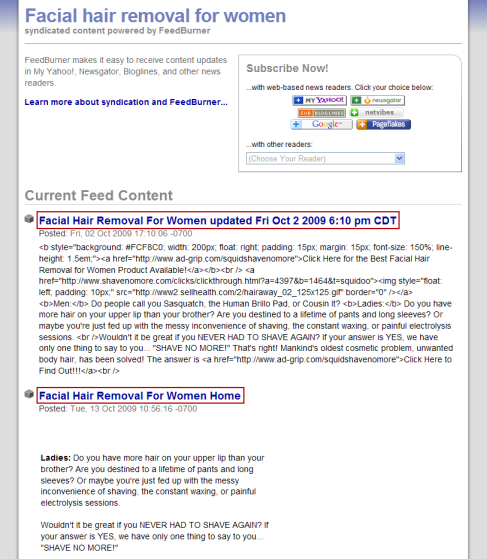
http://www.squidoo.com/facial-hair-removal-for-women
http://facial-hair-removal-for-women.wetpaint.com
http://facialhairremovalforwomen.lovelyish.com
How Many Accounts Can I Create Within Squidoo, Hubpages, Etc.?
When creating pages within one account (one email/password) we recommend creating up to 30 lenses/hubs MAX. You can create more – but it’s wise to diversify by using different accounts – because if just one account were to be cancelled, you would loose all of the pages created within it.
You can create up to 10 separate Squidoo/Hubpages accounts (sometimes less) – before you will be inhibited based on your IP address.
If you want to continue creating multiple-accounts (for multiple niches) we recommend using findnot.com or uniqueinternetservices.com to mask your IP address (use the “commercial service” and we suggest using the “broadband ips”)
How Do I Create An Animoto Video For My Sites?
Anitmoto is a very cool online service that allows users to easily create promotional videos from .gifs and .jpgs of their products/services. There is a free version and a paid version – but the free version only allows videos of 30 seconds or less – and charges a small “download fee” for each video. For our purposes, a simple 30 second video is fine.
If you create your videos yourself – you will learn how to do so for all future projects (which ain’t a bad idea).
Here are the steps:
1. Choose 8-10 images of your product (these can often be “borrowed” from the vender’s website) none of which can be any larger than 5mb each.
2. Create one “INTRO PAGE” that basically is your Web 2.0 URL with something promotional to be displayed on the beginning and end of your video.
To do this, use a simple PAINT document to create your into/outro file – and save it as a .jpg that is no smaller than 640X480. (Note: You can also watermark each slide – but this will be more work).
Free Watermark Software (for your videos)
Watermark-Software Training Video
What Is Pinging And How Do We Use It? (Creating RSS FEEDS)
“Pinging” is a way to tell the search engines that your site has been updated. This is similar to “ringing the dinner bell” for the search engine “spiders” to come and feed on your new content.
Any property with an RSS feed can (and should) be pinged when it is created or updated. It is also common for us hard-core promoters to ping BOTH the RSS feed and the primary URL of a property that has been created/updated.
There are 2 free pingers that you can use to ping your sites – and Howie’s Pinger which is free for apprentices to use.
Training Video: http://video.nameserve-two.info/apprentice/rssmerge
2 other popular pinging tools are Autopinger and Pingomatic
How To Create And Submit Press Releases
There are generally 2 types of press releases, expensive “$200” ones (used to promote flagship sites) and inexpensive “press release directory” submissions.
Here is a training video on how to create, format and submit your press releases for Howie’s outsourcers to submit to the press release directories.
Watch here: Press Release Video
What Are The Best Keyword Modifiers To Use?
Your keyword research will give you the best modifiers for your niche, but these are always a good starting point…
- buy
- discount
- free shipping
- buy online
- coupon
- buy now
- compare
- review
- compare prices
- cost
YouTube – Where Is The RSS Feed?
You need to create your own RSS feed with YouTube.com…
Use this template:
feed://www.youtube.com/rss/user/insert username here/videos.rss